
Passwords must be a minimum of 12 characters and contain at least:
- 1 number
- 1 special character (see list below)
- 1 upper case character
- 1 lower case character.
The best passwords are easy to remember and difficult to guess. We suggest using a simple phrase or life-long goal as the basis of your password. Remove or add spaces, randomly capitalize letters, and include one or more special characters.
Special characters:
^ $ * . [ ] { } ( ) ? ” ! @ # % & / \ , > < ‘ : ; | _ ~ ` = + –
To change or reset your password, use the Forgot Password function by following these steps:
- If you are already signed into BEACON, click the Logout button in the upper right and proceed to Step 2.
If you are not signed into BEACON, start at Step 3. - From the Sign In page, enter the email that you use to log into BEACON in the Username field. Then click Next.

- Click the Forgot Password? link.

- Enter your user name, and click Reset my password.

- Check your email inbox for a Reset Password email from Badger Meter, open the email and copy the reset code.
- Enter the reset code in the Code field.


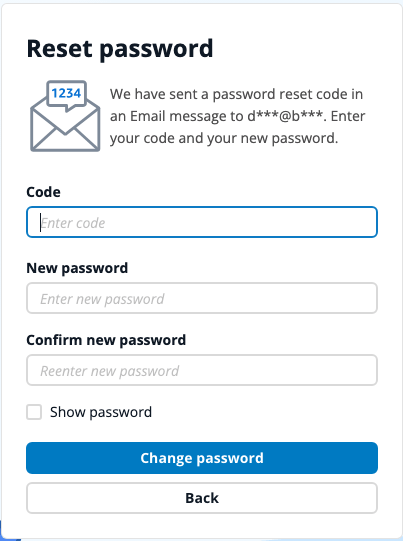
Note: The reset password link in the email expires after 48 hours.
How to Access Different Utilities
Users with access to more than one water utility must use one password when logging into BEACON.
To switch your view to another utility, select that company from the Select Utility list.

TIP: If you have access to many water companies, start typing a company name in the search box to locate the water company you want to view.


